


Zabbix API starts to play significant role especially when it comes to integration of Zabbix with third-party software like configuration and incident management systems as well as for automation of routine tasks. It is incredibly difficult to manage monitoring of thousands of hosts without some automation in place.
The API was introduced in Zabbix 1.8 and is already used widely. All Zabbix mobile clients are based on the API, even the native WEB front-end is partially built on top of it. The API middleware makes the architecture more modular and helps to avoid direct calls to the database.
Zabbix API provides two main functions:
- remote management of Zabbix configuration
- remote retrieval of configuration and historical data
Preparing environment
I will use Perl for my “Hello API” example. Zabbix API is based on JSON-RPC 2.0 specification and Perl provides a very nice module for working with JSON-RPC protocol called JSON::RPC.
On my Ubuntu desktop I didn’t have it installed, so I had to run apt-get:
sudo apt-get install libjson-rpc-perl
Great! Now we are ready to do some hacking.
Authentication
Any Zabbix API client has to authenticate itself before doing actual work. User.login method is exactly what we need.
The method accepts a user name and a password and returns back Authentication ID, a secure hash used for consecutive API calls.
Look at auth.pl:
#!/usr/bin/perl

use 5.010;
use strict;
use warnings;
use JSON::RPC::Client;
use Data::Dumper;

# Authenticate yourself
my $client = new JSON::RPC::Client;
my $url = 'http://testserver.zabbix.com/zabbix/api_jsonrpc.php';
my $authID;
my $response;

my $json = {
jsonrpc => "2.0",
method => "user.login",
params => {
user => "Admin",
password => "zabbix"
},
id => 1
};

$response = $client->call($url, $json);

# Check if response was successful
die "Authentication failed\n" unless $response->content->{'result'};

$authID = $response->content->{'result'};
print "Authentication successful. Auth ID: " . $authID . "\n";
Note that you should alter $url and also the user name and the password to match your setup.
Let’s run it:
zabbix@testserver:~$ ./auth.pl
Authentication successful. Auth ID: 15ff2edb84ce8e16585e035da42c1e9d
zabbix@testserver:~$
So far so good. Our auth.pl connected and authenticated successfully. Now we have the Authentication ID, which could be re-used for new API calls.
Getting list of hosts
The script hosts.pl does exactly what auth.pl did before but also executes method host.get for getting list of available hosts.
#!/usr/bin/perl

use 5.010;
use strict;
use warnings;
use JSON::RPC::Client;
use Data::Dumper;

# Authenticate yourself
my $client = new JSON::RPC::Client;
my $url = 'http://testserver.zabbix.com/zabbix/api_jsonrpc.php';
my $authID;
my $response;

my $json = {
jsonrpc => "2.0",
method => "user.login",
params => {
user => "Admin",
password => "zabbix"
},
id => 1
};

$response = $client->call($url, $json);

# Check if response was successful
die "Authentication failed\n" unless $response->content->{'result'};

$authID = $response->content->{'result'};
print "Authentication successful. Auth ID: " . $authID . "\n";

# Get list of all hosts using authID

$json = {
jsonrpc=> '2.0',
method => 'host.get',
params =>
{
output => ['hostid','name'],# get only host id and host name
sortfield => 'name', # sort by host name
},
id => 2,
auth => "$authID",
};
$response = $client->call($url, $json);

# Check if response was successful
die "host.get failed\n" unless $response->content->{result};

print "List of hosts\n-----------------------------\n";
foreach my $host (@{$response->content->{result}}) {
print "Host ID: ".$host->{hostid}." Host: ".$host->{name}."\n";
}
The script generates a list of all our hosts sorted by host name:
zabbix@testserver:~$ ./hosts.pl
Authentication successful. Auth ID: a2977c028faa93bb34d4ed9f2d379d9f
List of hosts
-----------------------------
Host ID: 10085 Host: MySQL DB
Host ID: 10086 Host: Oracle DB
Host ID: 10087 Host: PostgreSQL DB
Host ID: 10088 Host: Test 001
Host ID: 10089 Host: Test 002
Host ID: 10090 Host: Test 003
Host ID: 10084 Host: Zabbix server
zabbix@testserver:~$
Data flow
The diagram represents typical data flow when working with Zabbix API. The authentication (method user.login) is a mandatory step needed for getting Authentication ID. The ID allows us to call any method of the API provided we have enough permissions.
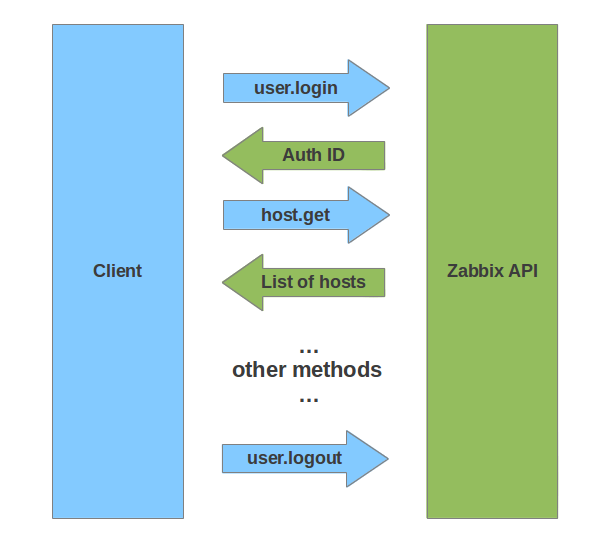
I missed method user.logout in my Perl scripts for simplicity sake. The method invalidates the Authentication ID, therefore it cannot be used anymore.
You may also use function Dumper() from the excellent package Data::Dumper in your code in order to get JSON response in a human readable format:
Dumper($response->content);
The result will look like:
$VAR1 = {
'jsonrpc' => '2.0',
'id' => 2,
'result' => [
{
'name' => 'MySQL DB',
'hostid' => '10085'
},
{
'name' => 'Oracle DB',
'hostid' => '10086'
},
{
'name' => 'PostgreSQL DB',
'hostid' => '10087'
},
{
'name' => 'Test 001',
'hostid' => '10088'
},
{
'name' => 'Test 002',
'hostid' => '10089'
},
{
'name' => 'Test 003',
'hostid' => '10090'
},
{
'name' => 'Zabbix server',
'hostid' => '10084'
}
]
};
I hope we learned how to use Zabbix 2.0 API for basic operations. It wasn’t too difficult, right?
Additional reading

 Prev Post





This is a placeholder comment.
This is a placeholder comment.
This is a placeholder comment.
This is a placeholder comment.
This is a placeholder comment.
This is a placeholder comment.
This is a placeholder comment.
This is a placeholder comment.
This is a placeholder comment.
This is a placeholder comment.
This is a placeholder comment.
This is a placeholder comment.
This is a placeholder comment.
This is a placeholder comment.
This is a placeholder comment.
This is a placeholder comment.
This is a placeholder comment.
This is a placeholder comment.
This is a placeholder comment.
This is a placeholder comment.
This is a placeholder comment.
This is a placeholder comment.
This is a placeholder comment.
This is a placeholder comment.
This is a placeholder comment.
This is a placeholder comment.